
How review requests work
Every request carries your review link. The customer taps it and lands on your Google review box. The message itself lives in Reputation Settings (SMS Requests and Email Requests), so you write it once and every way below uses it. Until they click, revenu can repeat the ask for you.
Write the message once
Open Reputation Settings > SMS Requests. Choose when it sends, whether it repeats until clicked, and the number it comes from. Then edit the template.
Marketing› Reputation› Reputation Settings› SMS Requests3 See it on the App mapSMSHi {{contact.first_name}}, thanks for choosing {{location.name}}. Would you mind leaving us a quick review? It really helps: {{reputation.review_link}} Reply STOP to opt out.Email subjectHow did we go, {{contact.first_name}}?Email bodyHi {{contact.first_name}}, Thanks for having us. If you've got a minute, a short review would mean a lot to a local business like ours: {{reputation.review_link}} Thanks, {{location_owner.first_name}} {{location.name}}The {{ }} parts fill in by themselves with your business and customer details when it sends.
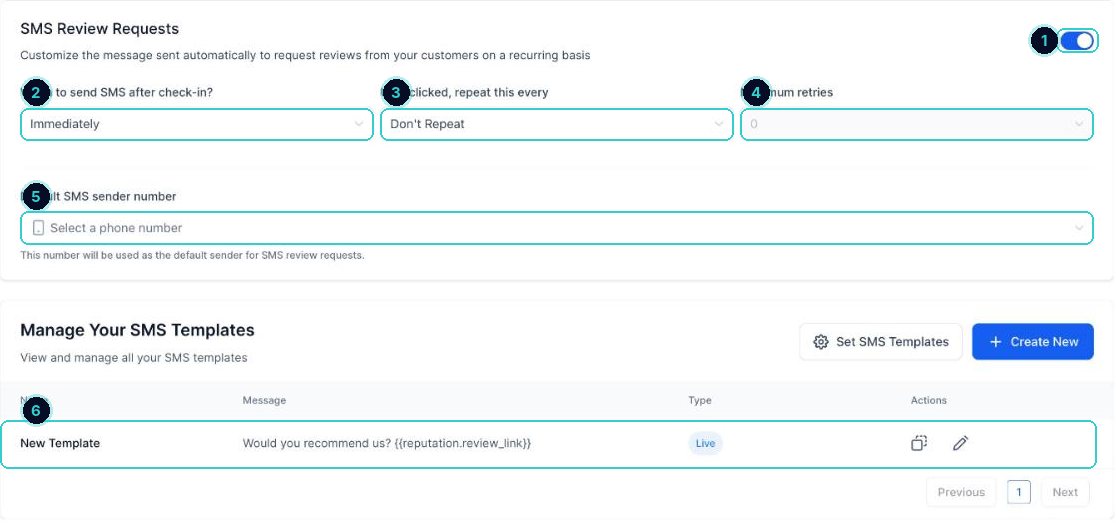
1 on, 2 when, 3 repeat until clicked, 4 how many times, 5 the number it comes from, 6 the message. tipSet it to repeat every 2 days, up to 2 times. Most reviews come from the first reminder.
By hand for one customer. From Contacts for a batch. Workflow so you never have to remember. QR for walk-in and counter businesses.
Send one by hand
Open Requests
Go to Marketing > Reputation > Requests and click Send Review Request.
Marketing› Reputation› Requests2 See it on the App mapPick the customer and the channel
Search for the customer (or create them). Their phone and email fill in. Tick SMS, Email or both, check the message and the number it comes from, then click Send Review Request.
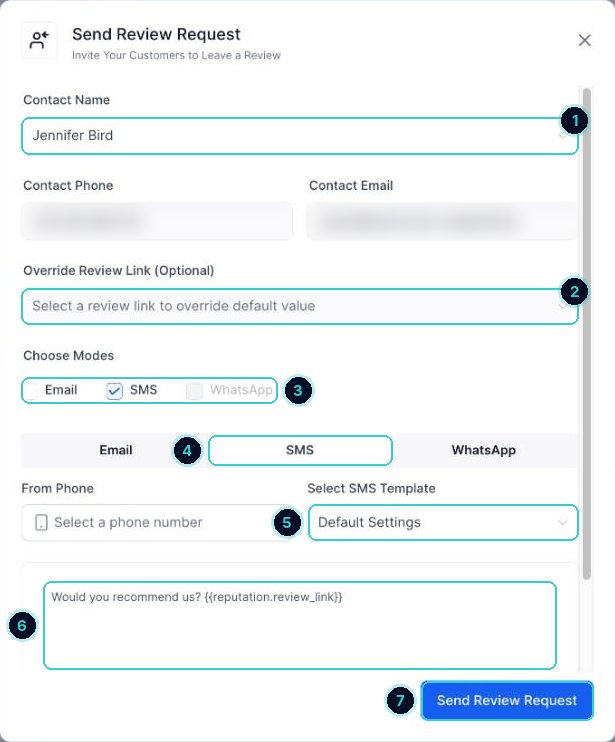
1 customer, 2 a different review link if you need one, 3 SMS, email or WhatsApp, 4 and 5 the channel's template, 6 the message, 7 send. Watch it on the Requests list
Each request shows its status (sent, clicked, reviewed), so you can see who still needs a nudge.
Customers get a link straight to your review page, reminders go out until they click, and new reviews show under Reputation.
Want revenu to set this up for you? See how
Next up
People who did this also asked
Reviews, the full picture: native requests vs workflows
Two ways to ask for reviews, when to use each, plus AI replies, widgets and spam reviews.
- 1Where everything lives
- 2Way 1, native requests: simplest
- 3The message to use
Reply to Google reviews, and handle a bad one
Answer every review from one place, and deal with a bad review without making it worse.
- 1Connect Google
- 2Open your reviews
- 3Reply to the good ones
Connect your Google Business Profile
Pull in your reviews and post to Google from your account.
- 1For reviews
- 2For posting
- 3If it stops working
Make a QR code
For flyers, vans, counters and business cards. It tracks scans too.
- 1Start one
- 2Choose where it goes
- 3Style it