
Open the calendar view
Go to CRM > Calendars > Calendar View and click + New (or click a time slot).
CRM› Calendars› Calendar ViewFill it in
Pick the calendar and contact, the date and slot, and the status. Book appointment sends their usual confirmation.
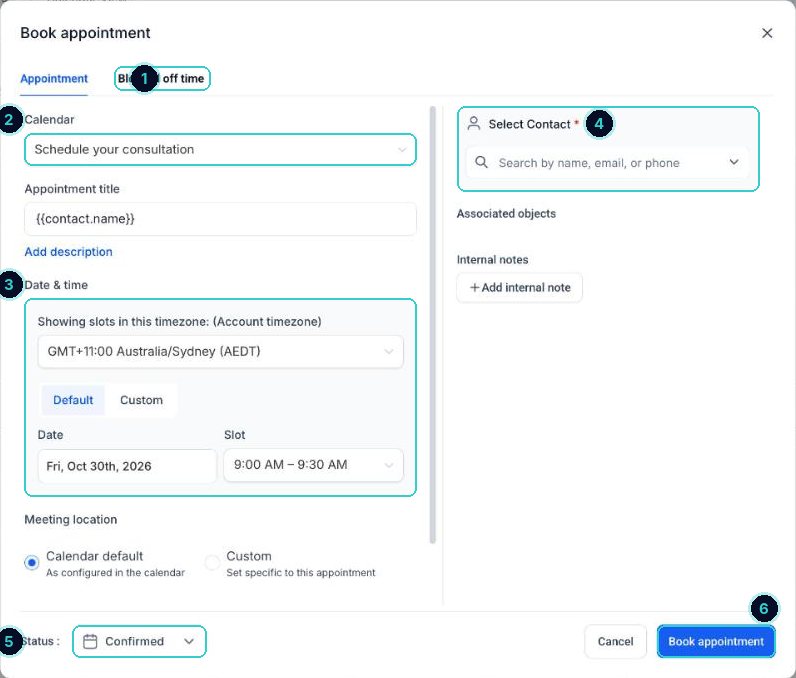
1 blocked off time instead, 2 calendar, 3 date and slot, 4 the customer, 5 status, 6 book. Need a time outside hours?
Choose Custom under Date & time to book a time that isn't an open slot.
When it's done
The booking's in, the customer gets their confirmation, and reminders run as normal.
Did this match what you see?
Next up
People who did this also asked
163 ways
Send appointment reminders
Three ways to remind people: the calendar's own reminders, a ready-made workflow, or one you build yourself.
- 1How reminders work
10 min · 1 steps
91
Block out holidays and days off
Stop bookings on public holidays, leave days or a long lunch.
- 1Open the calendar view
- 2Choose Blocked off time
- 3Whole closures
3 min · 3 steps