
Open Payment Links
Go to Commerce > Payment Links and click Create New Payment Link.
Commerce› Payment LinksPick the product and options
Choose the product. Tick what you need: their phone number, their address, coupon codes, or send them to your own thank-you page after they pay. Change the button text if Pay doesn't suit.
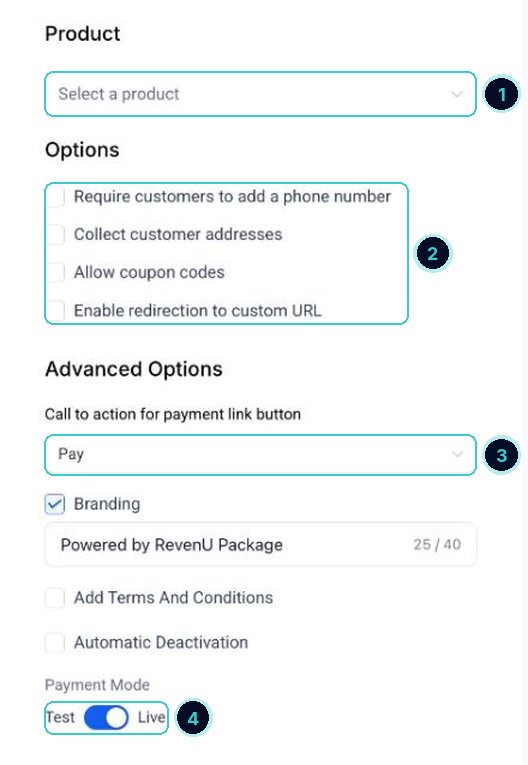
1 what they're paying for, 2 what to collect, 3 the button text, 4 test or live payments. Check it's on Live
Payment Mode must be on Live for real payments. Use Test only while you try it with a test card.
Save, then Copy / Send
Click Save. Copy / Send then lights up: copy the link or send it straight to a contact.
MessageHi {{contact.first_name}}, here's the link to pay for your booking with {{location.name}}. It takes a minute by card.The {{ }} parts fill in by themselves with your business and customer details when it sends.
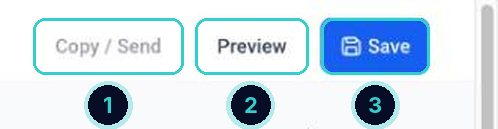
1 copy or send (after saving), 2 see what they'll see, 3 save.
Customers open the link, pay by card, and the payment shows in Commerce > Transactions.
Next up
People who did this also asked
Send an invoice
Four ways to bill a customer: a one-off invoice, a recurring one, a link you send yourself, or a pay-now link in the chat.
- 1How invoices work
Connect Stripe to take payments
Link your Stripe account so invoices, payment links, bookings and stores can charge cards.
- 1Open payment integrations
- 2Sign in to Stripe
- 3Test mode first
Make a QR code
For flyers, vans, counters and business cards. It tracks scans too.
- 1Start one
- 2Choose where it goes
- 3Style it
Sell products online
Add your products and put them in a simple online store.
- 1Add your products
- 2Create the store
- 3Add products and payments