
How a lead reaches you
Someone fills in a form, chats, calls or answers an ad. revenu creates a contact for them in Contacts, then a workflow or form notification tells you. So there are only two places it can break: the lead never arrives, or it arrives and nobody tells you. Steps 1 to 3 find out which. Everything after that fixes it.
Send a test from your phone, off the office wifi
Fill in your own form, or start a chat, on mobile data. Some office networks and ad blockers stop forms loading, so a test from the desk can fail when the form is fine. Use a name you can spot later.
Name to typeTEST Please DeleteCheck the contact landed
Open Contacts and search for the test name, then also search your email address and mobile. A repeat enquirer can update their old record instead of making a new one, so searching by name alone can miss them. Found it: the form works, skip to step 5 (the alert is the problem). Not found: go to step 4.
CRM› Contacts8 See it on the App mapNot found? Check the form's submissions
Open Sites > Forms > Submissions and filter by your form. If the submission is listed, the form did its job, so check the form's fields are matched to contact fields and that email or phone is filled in. If it isn't listed, the form isn't loading or isn't the one on your live page. Open the live page on your phone and confirm the form shows and submits. No luck: ask Charlie to check the embed.
Sites› FormsLanded but no alert? Check who gets notified
Open the form in the builder and look at the notification recipients. Check the email is spelt right and is one you actually read. If the alert comes from a workflow instead, open it and check the Send internal notification step points at the right person and the workflow is Published, not Draft.
Sites› Forms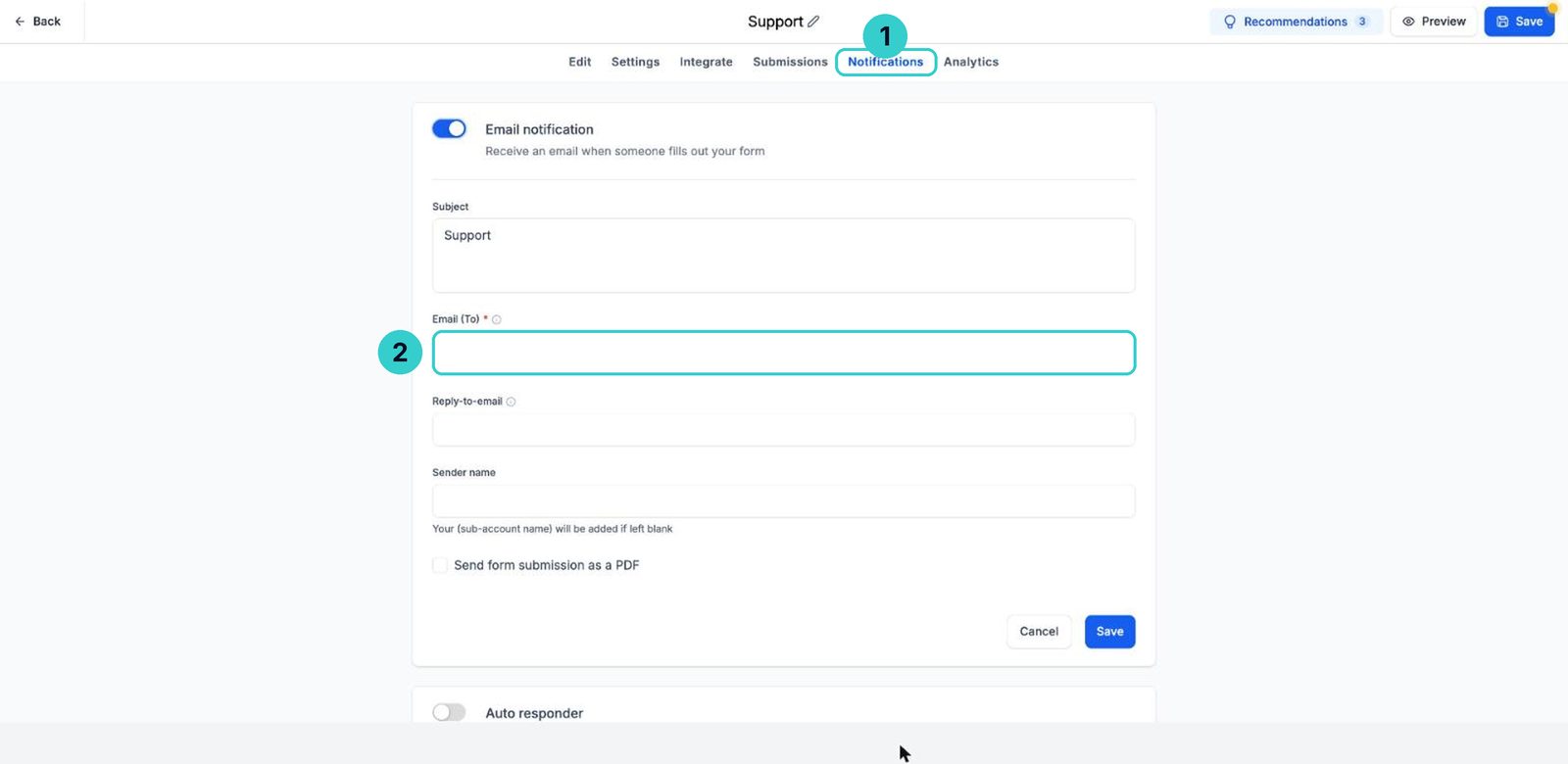
tipWant a text as well as an email? See Get a text or email when a new lead comes in.
Look in spam and promotions
Alerts from a new sending address often land in spam the first few times. Search your inbox for the form name or your business name. Mark one as not spam and add the sending address to your contacts.
Check the workflow ran
Open Automations > Workflows, open the workflow that should fire, and check Enrollment History for your test contact. Listed: the trigger worked and the fault is a later step. Not listed: the trigger or its filters. Why isn't my workflow working? walks through each cause.
Automations› Workflows5 See it on the App mapFacebook and Instagram lead forms
These stop flowing when the Facebook connection expires or you've changed the Page or form. Reconnect under Settings > Integrations, check the workflow trigger still points at the right Page and form, then send a test lead from Meta's lead ads testing tool.
Settings› IntegrationsPhone calls and texts
If the missing leads are calls or texts, check your number has its regulatory bundle linked (Settings > Communications > Phone System > Regulatory Bundles). Australian numbers without one can stop working. Then check Missed call text back is on.
Settings› Communications› Phone System1 See it on the App mapChat widget
Open Sites > Chat Widget and check the widget is switched on and set to appear on your site. If you've changed your website recently, the widget code may have been lost, so ask Charlie to check.
Sites› Chat WidgetCheck your account is paid up
If a card payment failed, automations can pause until it clears. Settings > Billing shows the status and lets you update the card. Also check your wallet balance if texts are part of the flow.
Settings› BillingStill nothing? Send Charlie the details
Tell Charlie which form or channel, roughly when it stopped, and what you've already checked. A screenshot helps. He checks the account and passes it to Adam with everything attached.
Message to CharlieLeads from [form, chat, calls or Facebook] stopped coming through around [date]. I sent a test at [time] and it [did not show in Contacts / showed but I got no alert]. I've checked spam and the form's notification email.About 220 characters, 2 texts per person. Check the costType your own details over the [ ] parts. This text goes into an AI prompt or a page, where merge fields don't fill in.
Your test lead shows in Contacts and the alert reaches your inbox.
Next up
People who did this also asked
Get a text or email when a new lead comes in
An internal notification tells you or your team the moment someone enquires.
- 1How it works
- 2Make the workflow
- 3Add the alert
Why isn't my workflow working?
Eleven things that quietly stop automations, most likely first, and how to check each in a minute.
- 1How a workflow runs
- 2It's still a draft
- 3Check Enrollment History
Get Facebook and Instagram leads straight into your account
Leads from your Meta ad forms land in Contacts and get an instant reply. Connect it once, or bring leads in by file as a backup.
- 1Connect Facebook
- 2Pick your Page and Instagram
- 3Start a workflow from the form
My Australian number stopped calling or texting
Australian local numbers (02, 03, 07, 08) need an approved business bundle linked by 31 March 2027, or they stop sending and receiving calls and texts. Your number shows "Bundle Required" and a countdown until it's done. Mobile and toll-free numbers need one too. Check that first.
- 1Check the regulatory bundle first
- 2Why it happens
- 3Send revenu your details
Put an enquiry form on your website
Build the form once, then put it on your site four ways: in your revenu site, embed it, share a link, or print a QR code.
- 1Open the page in the editor
- 2Add the form
- 3Publish and test
Reply to customers from one inbox
Texts, emails, chats, calls and socials, all in one thread per customer.
- 1Open Conversations
- 2Start with Unread
- 3Open the customer
Text back missed calls automatically
Miss a call on the tools and the caller gets a text in seconds.
- 1Open Phone System
- 2Open Missed Call Text Back
- 3Tick Enable Missed call textback