
From Contacts for a one-off message. A workflow when the same text should go to everyone who gets a tag, now and in future.
From your Contacts list
Pick who it's for
Go to CRM > Contacts. Open a smart list or filter, then tick the people. Select all picks the whole list, not just this page.
CRM› Contacts1 See it on the App mapMore > Send SMS
In the bar above the list, click More, then Send SMS.
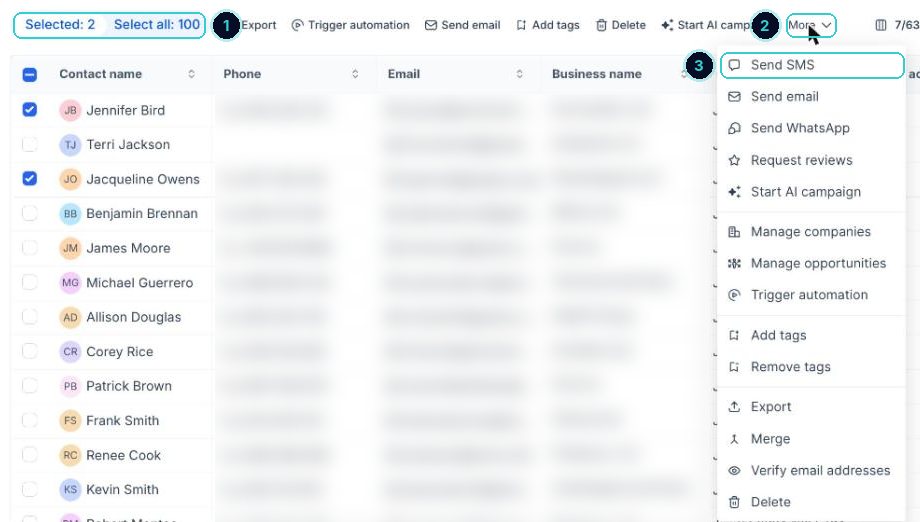
1 how many you ticked, 2 More, 3 Send SMS. Write it once
Give it a name you'll recognise later, pick the number it comes from, choose a saved template or write the message. Use the tag icon to add merge fields.
Action nameSpots open next weekTextHi {{contact.first_name}}, {{location.name}} here. We've got a few spots open next week if you've been meaning to book: {{custom_values.booking_link}} Reply STOP to opt out.The {{ }} parts fill in by themselves with your business and customer details when it sends. Ones starting
custom_valuesneed that value set up once in CRM > Custom Values. How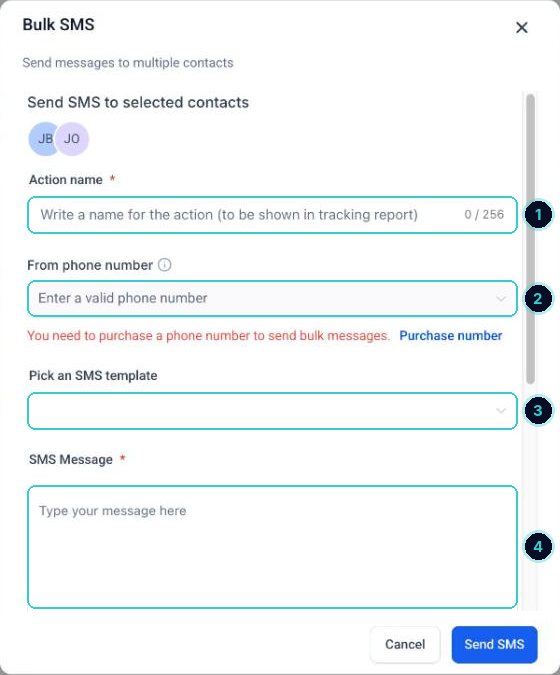
1 a name, 2 the number it comes from, 3 a saved template, 4 the message. Choose the pace, confirm consent, send
Send all at once, at a scheduled time, or in drip mode (a set number every so often). Tick the box confirming these people agreed to hear from you, then Send SMS. It can't be undone, so check it twice.
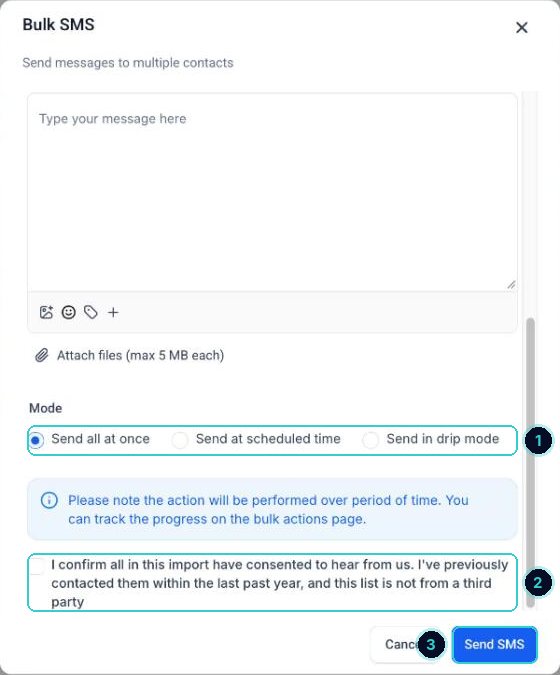
1 now, later or drip, 2 confirm consent, 3 send. tipPaste the text into the SMS calculator first. Over 160 characters it costs two texts per person.
The right people get one clear text, and opt-outs are handled automatically.
SMS cost calculator ›Next up
People who did this also asked
Smart lists: segment your contacts and why it pays
Save a filtered view of your contacts (like 'customers from last year who haven't booked') and message only them.
- 1Why segment
- 2Open contacts and filter
- 3Segments worth saving
What makes an SMS segment (and why some texts cost more)
Texts are billed in segments. One emoji can double the cost. Here's the rule.
- 1One segment is 160 characters
- 2Longer texts split
- 3Emoji and some symbols change the rule
Why didn't my text send?
Read the error on the message, then fix the cause before trying again.
- 1Find the error
- 2They opted out
- 3Do Not Disturb is on
Add contacts to a workflow
Put a whole list into a workflow at once, one person by hand, or anyone who gets a tag.