
Open the conversation
Go to CRM > Conversations and open the customer.
CRM› Conversations› Inbox4 See it on the App mapClick the $ in the message box
With SMS picked as the channel, click the $ icon under the message box, then pick the product or type the amount.
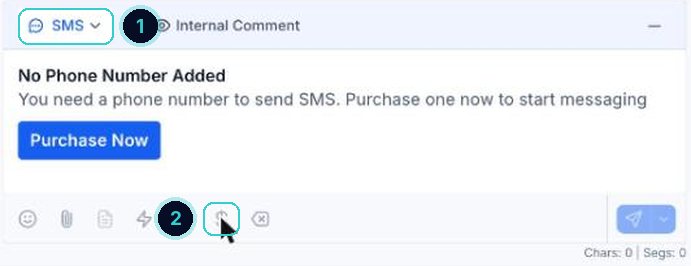
1 the channel, 2 the payment button. Send it
Send. The customer taps the link and pays.
Check it came through
The payment shows in Commerce > Transactions.
Commerce› Transactions
When it's done
The customer pays from their phone and the payment sits against their contact.
Did this match what you see?
Next up
People who did this also asked
204 ways
Send an invoice
Four ways to bill a customer: a one-off invoice, a recurring one, a link you send yourself, or a pay-now link in the chat.
- 1How invoices work
5 min · 1 steps
03start here
Reply to customers from one inbox
Texts, emails, chats, calls and socials, all in one thread per customer.
- 1Open Conversations
- 2Start with Unread
- 3Open the customer
5 min · 5 steps