
How it works
A gift card is a balance with a code. You create the card options (say $50, $100, $200), sell them, and the buyer sends the card on to a friend. When the friend spends it, the balance drops.
Create your gift cards
Go to Commerce > Gift Cards and start a new card. It is a 4-step wizard: Basic information, Customize card, Values/Tax/Category, then Review. Add a short description and the amounts you want to sell. Pick the Expiry date with the date picker. It must be at least three years away for gift cards sold to consumers (see the rules below). Terms and Conditions is required, so paste yours in before you can finish. Check everything on Review, then save.
Commerce› Gift CardsNameGift cardDescriptionA gift card for any service at our shop. Valid for three years from purchase.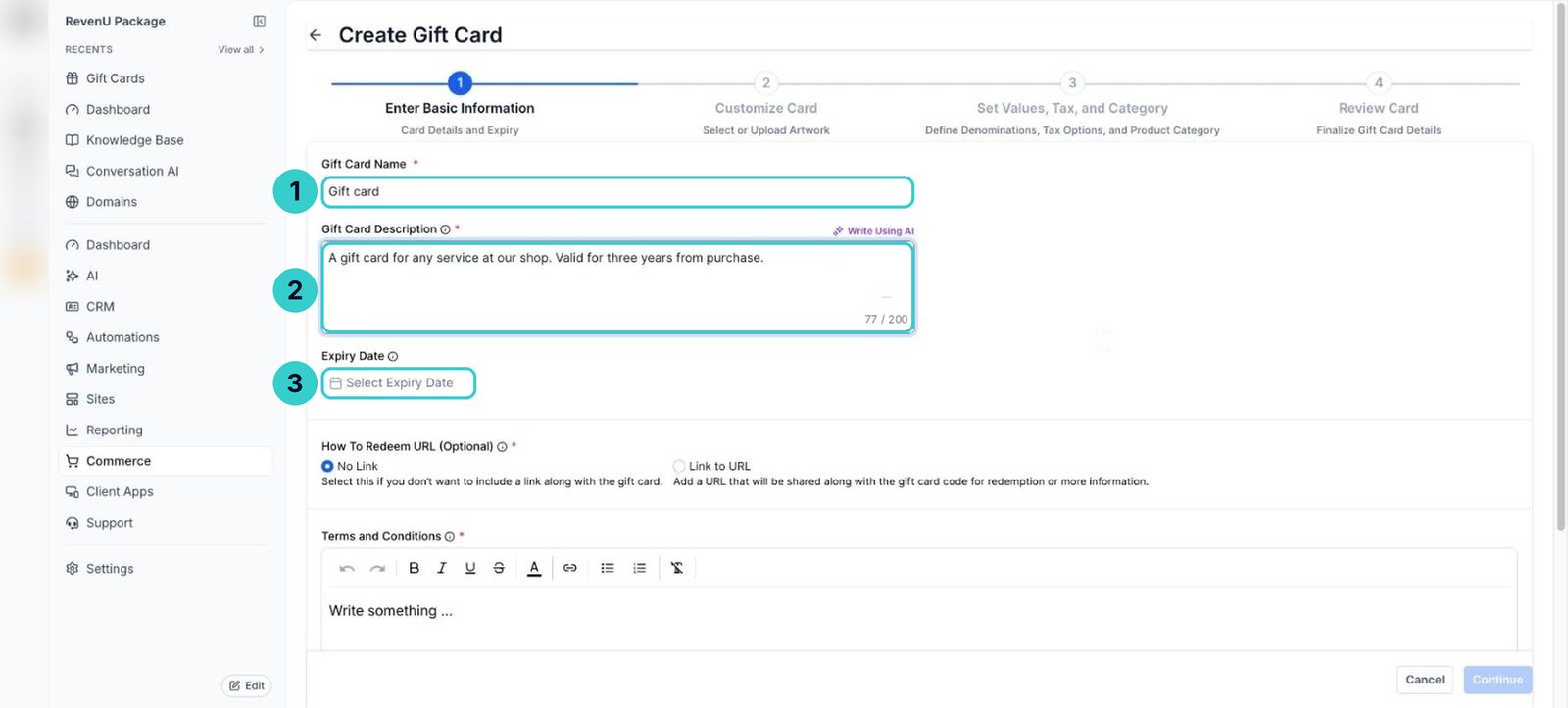
Sell them
Add the gift card to a payment link or your website so people can buy it. The buyer gets the card to send on.
Redeem at checkout for online sales. Redeem on the appointment for services. Redeem on an offline payment for in-person sales at the counter.
Redeem at checkout
Enter the code at checkout
The customer types the gift card code at checkout. The balance comes off the total and they pay the rest.
Check the balance
Open Commerce > Gift Cards to see what's left on the card.
Commerce› Gift Cards
People can buy gift cards, and you can redeem them online, on appointments and at the counter, with the balance tracked.
Next up
People who did this also asked
Create a payment link
A link customers tap to pay for one of your products. Share it in a message, an email, a QR code or on your site.
- 1Open Payment Links
- 2Pick the product and options
- 3Check it's on Live
Connect Stripe to take payments
Link your Stripe account so invoices, payment links, bookings and stores can charge cards.
- 1Open payment integrations
- 2Sign in to Stripe
- 3Test mode first
Sell products online
Add your products and put them in a simple online store.
- 1Add your products
- 2Create the store
- 3Add products and payments
Send an invoice
Four ways to bill a customer: a one-off invoice, a recurring one, a link you send yourself, or a pay-now link in the chat.
- 1New Invoice
- 2Customer, number and dates
- 3Add the work, GST and any discount
Add GST to your products
Make sure the GST on your invoices, forms and online sales is added correctly, so customers see the right total.
- 1Start the invoice
- 2Add your items
- 3Add the GST line